
Product docs and API reference are now on Akamai TechDocs.
Search product docs.
Search for “” in product docs.
Search API reference.
Search for “” in API reference.
Search Results
results matching
results
No Results
Filters
Logical Replication to a Linode Managed PostgreSQL Database
Traducciones al EspañolEstamos traduciendo nuestros guías y tutoriales al Español. Es posible que usted esté viendo una traducción generada automáticamente. Estamos trabajando con traductores profesionales para verificar las traducciones de nuestro sitio web. Este proyecto es un trabajo en curso.
Logical replication with PostgreSQL allows you to stream changes from one database (the publisher) to another (the subscriber) at the table level. This makes it possible to replicate data across environments in near real-time, without disrupting the source database by taking it offline.
Logical replication is an alternative approach to the “dump-and-restore” method often used for data replication or migration. Logical replication is useful if you want:
- Zero Downtime Migration: Keep the source database online while synchronizing data to the destination.
- Continuous Synchronization: Maintain an ongoing sync between source and destination databases.
- Selective Table Replication: Only replicate specific tables, rather than the entire database.
This guide walks through the process of setting up logical replication from an existing PostgreSQL database to a Linode Managed Database running PostgreSQL.
Things to Know Before Getting Started
Before configuring logical replication, review the following key concepts and requirements. Understanding these can help you configure your databases correctly and avoid common issues during replication.
Key Terminology
Logical replication in PostgreSQL follows a publisher/subscriber (pub/sub) model. Here, the source database publishes table-level changes and one or more subscribers receive and apply them.
- Publisher: The source PostgreSQL database that exposes data changes through one or more publications.
- Subscriber: The destination PostgreSQL database that connects to a publisher and applies changes locally.
- Publication: A named set of tables on the publisher whose changes are made available to subscribers.
- Subscription: A replication object on the subscriber that connects to a publisher and retrieves changes from its publications.
- Write-Ahead Log (WAL): A sequential log of all database changes. Logical replication reads table-level changes decoded from this log.
- Replication Slot: Tracks the progress of each subscriber and retains required WAL segments until they’ve been consumed.
- WAL Sender (
walsender): A background process on the publisher that streams WAL-derived changes to the subscriber. - Apply Worker: A background process on the subscriber that replays incoming changes in transactional order.
The diagram below illustrates the logical replication flow between the publisher and subscriber:
(refer to diagram below) Logical Replication Flow

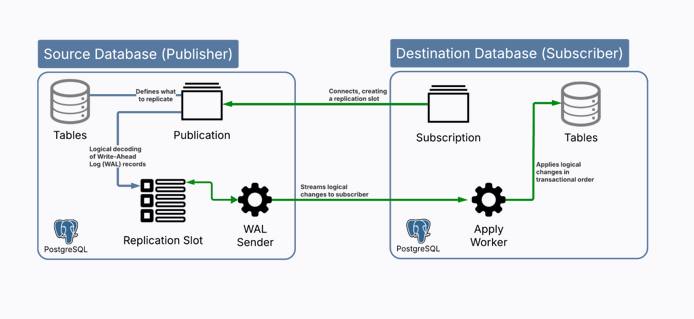
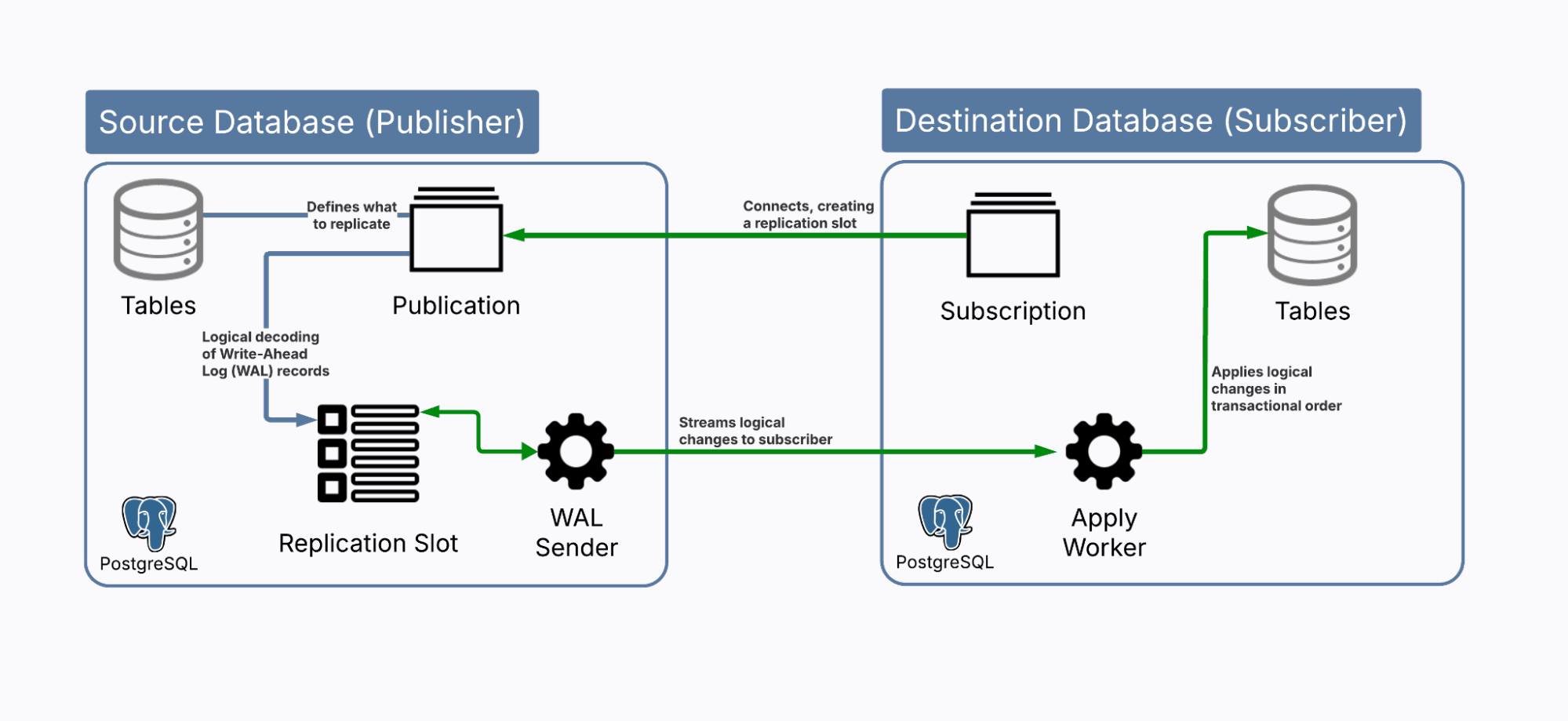
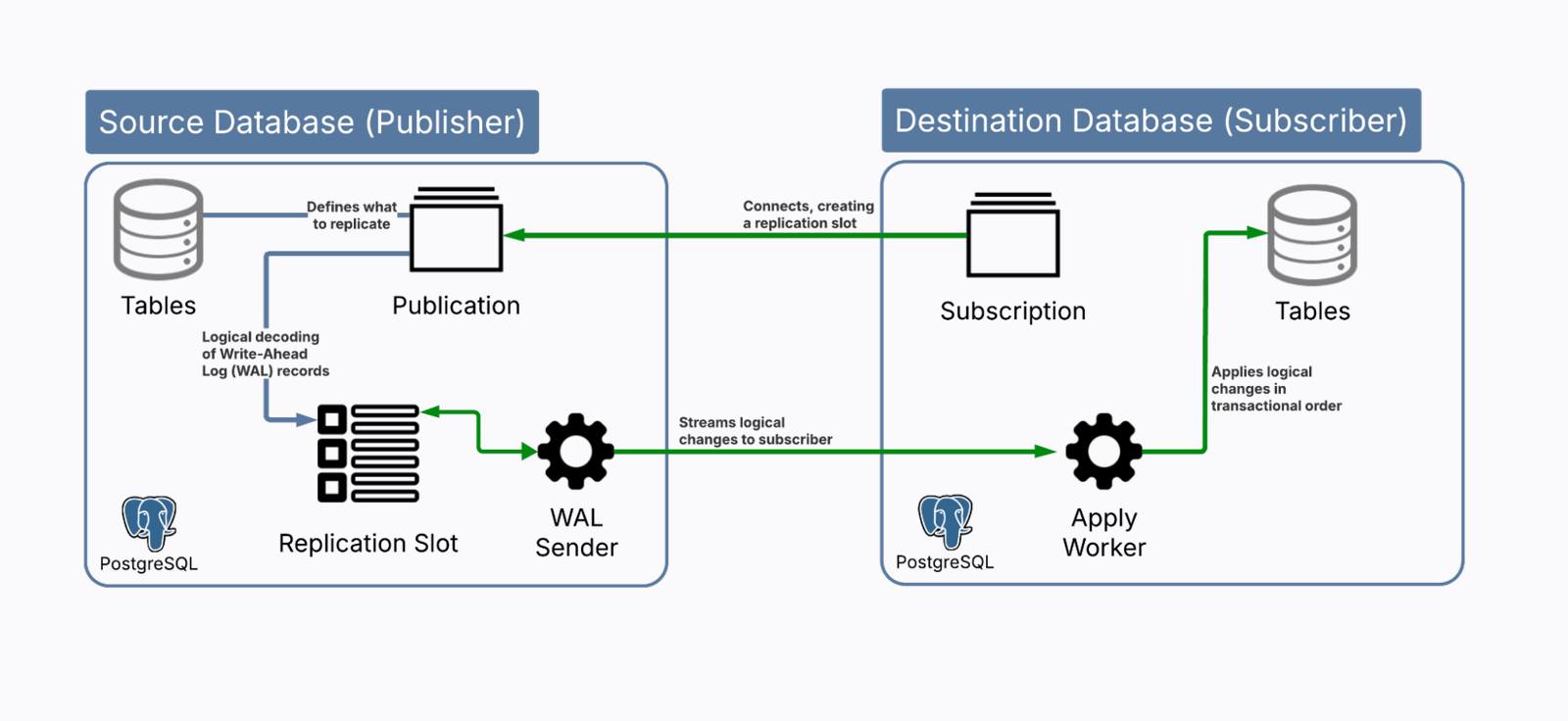
- The publisher defines what to replicate via a publication.
- Changes are captured from the Write-Ahead Log (WAL) and managed through a replication slot.
- A WAL sender streams these changes to the subscriber, which uses an apply worker to write them to local tables.
PostgreSQL Version Compatibility
Logical replication works across major versions of PostgreSQL, but some features may have compatibility limitations. Confirm that your source and destination PostgreSQL versions both support logical replication and are compatible with each other.
Server Settings
To enable logical replication, the source database server must be configured with the following parameters:
wal_level: Must be set tologicalto enable logical decoding.max_replication_slots: At least one slot is required per subscription.max_wal_senders: Should be equal to or greater thanmax_replication_slots.
Roles and Permissions
The source database should have a dedicated replication user. This user must have the REPLICATION attribute and SELECT privileges on any tables to be replicated. This is a security best practice, as it avoids using superuser or administrator accounts for replication purposes.
Network Access
Replication requires that the destination database can connect to the source over the network. This means ensuring the source database accepts connections from the Linode Managed Database.
Before You Begin
Follow our Get started guide to create an Akamai Cloud account if you do not already have one.
Follow the steps in the Akamai Cloud documentation to create a new database cluster.
Set up access control so that you can connect to the database from your local machine.
Install the Linode CLI on your local machine.
Install the
psqlclient on your local machine:sudo apt install postgresql-clientEnsure you have administrative access to your source PostgreSQL database.
Placeholders and Examples
The following placeholders and example values are used in commands throughout this guide:
| Parameter | Placeholder | Example Value |
|---|---|---|
| Destination Hostname | DEST_HOST | a334568-akamai-prod-183144-default.g2a.akamaidb.net |
| Destination IP Address | DEST_IP | 172.235.135.114 |
| Destination Port | DEST_PORT | 10033 |
| Destination Database | DEST_DB | defaultdb |
| Destination Username | DEST_USER | akmadmin |
| Destination Password | DEST_PASSWORD | thisismydestinationpassword |
| Subscription Name | SUBSCRIPTION_NAME | my_subscription |
Replace these placeholders with your own connection details when running commands in your environment.
Additionally, the examples used in this guide assume the source database contains three tables (customers, products, and orders) that you want to replicate to a Linode Managed Database.
Example Scenario
The examples used in this guide assume you have an existing PostgreSQL database hosted with a managed service from a cloud provider. This source database contains three tables (customers, products, and orders) that you want to replicate to a Linode Managed Database for PostgreSQL.
Configure the Source Database
The source PostgreSQL database must be properly configured to support logical replication and accept incoming connections from your Linode Managed Database.
Obtain the IP Address of the Destination Database
To configure access control on your source database, you first need the IP address of your Linode Managed Database. Begin by identifying your destination host (DEST_HOST).
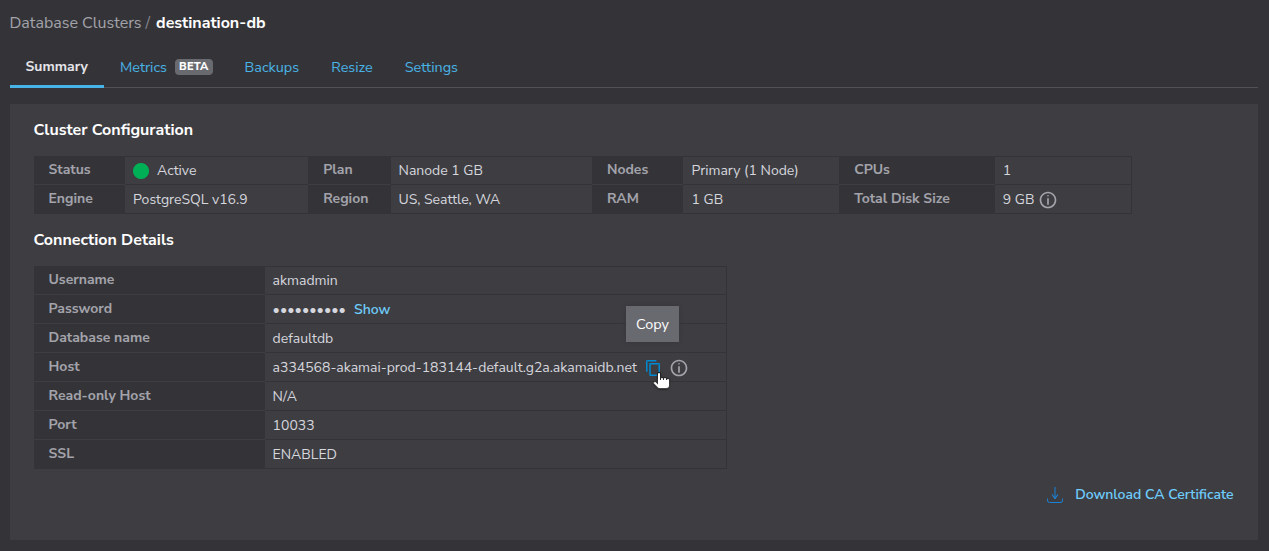
In the Akamai Cloud Manager, navigate to Databases, then select your database cluster and copy the Host string:
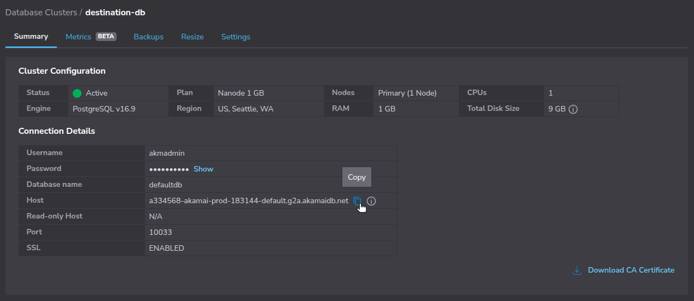
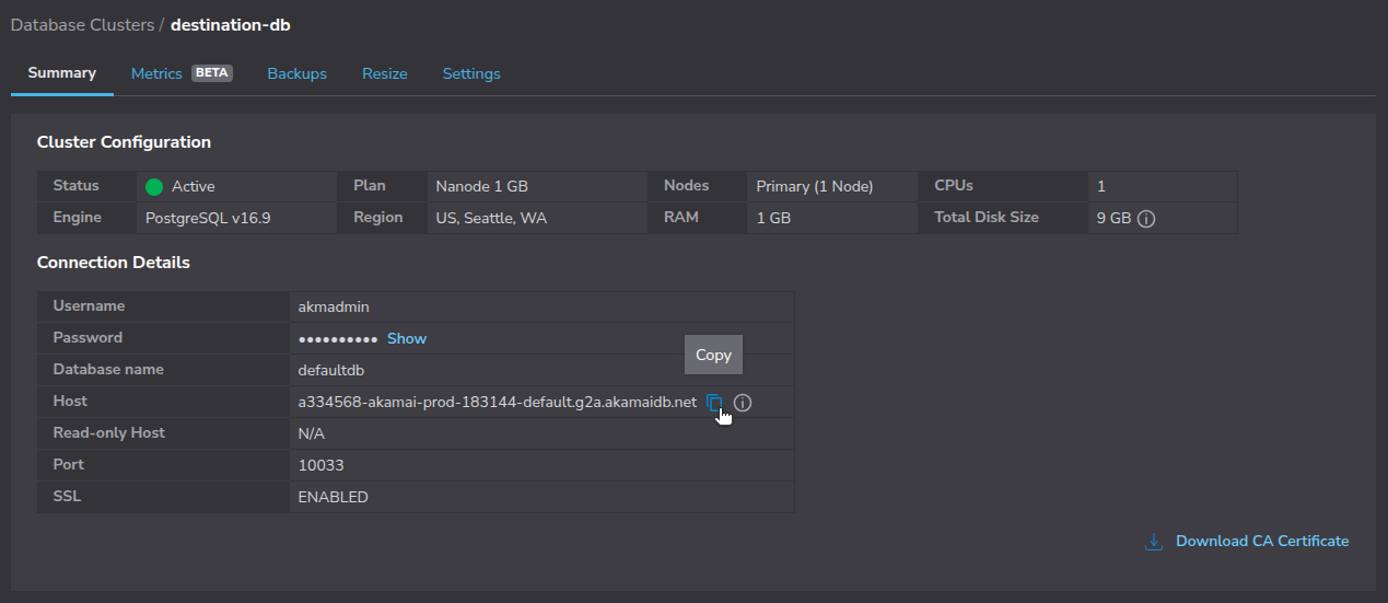
In the example above, the DEST_HOST value is
a334568-akamai-prod-183144-default.g2a.akamaidb.net
Use a DNS lookup tool such as
nslookupto resolve the IP address of your Linode Managed Database. Replace DEST_HOST with your actual value (e.g.,a334568-akamai-prod-183144-default.g2a.akamaidb.net):nslookup DEST_HOSTIn this example,
172.232.188.122is the DEST_IP:Non-authoritative answer: Name: a334568-akamai-prod-183144-default.g2a.akamaidb.net Address: 172.232.188.122 Name: a334568-akamai-prod-183144-default.g2a.akamaidb.net Address: 2600:3c0a::2000:fbff:fe65:756dBe sure to record your DEST_IP, as it is required in the cloud-specific preparation guides referenced in the next section.
Prepare the Source Database for Logical Replication
With your Linode Managed Database’s IP address located, follow the corresponding guide to prepare your source database for logical replication:
- Preparing your AWS RDS PostgreSQL Database for Logical Replication to Linode Managed Database
- Preparing your Azure PostgreSQL Database for Logical Replication to Linode Managed Database
- Preparing your Google Cloud SQL PostgreSQL Database for Logical Replication to Linode Managed Database
After completing the steps in one of the above guides, gather the following information for your source database:
| Parameter | Placeholder | Example Value |
|---|---|---|
| Source Hostname or IP Address | SOURCE_HOST | psql.managed-db-services.example.com |
| Source Port Number | SOURCE_PORT | 5432 |
| Source Database | SOURCE_DB | postgres |
| Replication Username | REPL_USER | linode_replicator |
| Replication Password | REPL_PASSWORD | thisismyreplicatorpassword |
| Publication Name | PUBLICATION_NAME | my_publication |
The remainder of this guide uses the example values shown above.
Configure the Destination Database
Configure your Linode Managed PostgreSQL database as the replication target. This involves two main tasks:
- Recreate the schema
- Create a subscription to the source publication
Create the Database Schema
Logical replication in PostgreSQL does not copy table definitions, it only replicates the data. This means you must manually create the destination tables to match the source database schema exactly. Use the same column names, types, constraints, and indexes to avoid replication errors.
At the command line, use
pg_dumpwith the--schema-onlyflag to connect to your source database and write the resulting SQL statements to a file. Replace SOURCE_HOST (e.g.psql.managed-db-services.example.com), REPL_USER (e.g.,linode_replicator), and SOURCE_PORT (e.g.5432) with your own values:pg_dump \ -h SOURCE_HOST \ -U REPL_USER \ -p SOURCE_PORT \ --schema-only \ --no-owner \ --no-privileges \ --schema=public \ SOURCE_DB > schema.sqlWhen prompted enter your Replication Password (e.g.,
thisismyreplicatorpassword) and press Enter.If you only want to create the schema for specific tables rather than the entire database, use the
--tableflag. For example, the following command only dumps the schema for thecustomersandorderstables:pg_dump \ -h SOURCE_HOST \ -U REPL_USER \ -p SOURCE_PORT \ --schema-only \ --no-owner \ --no-privileges \ --schema=public \ --table customers \ --table orders \ postgres > schema.sqlConnect to your Linode Managed Database using the
psqlclient. Replace DEST_IP (e.g,172.235.135.114), DEST_USER (e.g.,akmadmin), DEST_PORT (e.g,10033), and DEST_DB (e.g.,defaultdb) with your own values:psql \ -h DEST_IP \ -U DEST_USER \ -p DEST_PORT \ -d DEST_DBFrom the
psqlprompt, run the schema file to create the tables on the destination database:Destination psql Prompt\i schema.sql
Unless otherwise noted, remain logged in to the destination database for the remainder of this section.
Create a Subscription
Once the schema is in place, create a subscription on the destination database. This step connects your Linode Managed Database (the subscriber) to your source database (the publisher) and begins streaming changes.
While still logged in to the
psqlprompt, run theCREATE SUBSCRIPTIONcommand to create a subscription (e.g.,my_subscription) on the destination database. Remember to substitute placeholders for your own source database values:Destination psql PromptCREATE SUBSCRIPTION SUBSCRIPTION_NAME CONNECTION 'host=SOURCE_HOST port=SOURCE_PORT user=REPL_USER password=REPL_PASSWORD dbname=SOURCE_DB sslmode=require' PUBLICATION PUBLICATION_NAME;CREATE SUBSCRIPTIONOnce the subscription is created, PostgreSQL begins replicating data from the source to the destination.
Check Subscription Status
Once replication is active, monitor its status and verify that data is syncing correctly.
While still logged in to the destination database, run the following SQL command to retrieve information about the subscription:
Destination psql PromptSELECT * FROM pg_catalog.pg_stat_subscription;-[ RECORD 1 ]---------+------------------------------ subid | 16492 subname | my_subscription pid | 463099 leader_pid | relid | received_lsn | 0/D90038A0 last_msg_send_time | 2025-07-24 17:38:44.539465+00 last_msg_receipt_time | 2025-07-24 17:38:44.575312+00 latest_end_lsn | 0/D90038A0 latest_end_time | 2025-07-24 17:38:44.539465+00Note the following important fields in the output:
subname: The name of the subscriptionreceived_lsn: The last WAL location receivedlatest_end_lsn: The last WAL location appliedlast_msg_send_timeandlast_msg_receipt_time: Timestamps for the most recent activity
Compare WAL Positions
To verify how far along the subscriber is, compare the received_lsn (or latest_end_lsn) from the destination with the current WAL position on the source.
Open a new terminal window and use
psqlto establish a connection to the source (publisher) database:psql \ -h SOURCE_HOST \ -U REPL_USER \ -p SOURCE_PORT \ -d SOURCE_DBOn the source database, run the following SQL command to retrieve the current WAL log sequence number:
Source psql PromptSELECT pg_current_wal_lsn();pg_current_wal_lsn -------------------- 0/DA0009D8 (1 row)Compare this value with the
latest_end_lsnshown on the destination:- If they match or are close, replication is current and lag-free.
- A large gap may indicate replication delay or a connectivity issue.
Small differences are normal on active databases as new WAL entries are generated continuously.
When done, type
\qand press Enter to exit the sourcepsqlshell.
Validate Replicated Data
Verify that the expected data appears in the destination (subscriber) database.
Return to the terminal window connected to the Linode Managed Database (destination)
psqlprompt and run validation queries and other table checks to ensure that all rows were copied and continue to stay in sync, for example:Destination psql PromptSELECT COUNT(*) FROM public.customers;count ------- 2 (1 row)When done, type
\qand press Enter to exit the destinationpsqlshell.
You may want to repeat this validation periodically until the cutover is complete.
Finalize the Cutover
Once replication is stable and the destination database is fully caught up, complete the migration by redirecting application traffic and decommissioning the replication setup.
Redirect Application Traffic
Update your applications to point to the Linode Managed Database instead of the old source database. This involves changing the database host, port, username, and password in each application’s connection settings.
Test application connectivity to the new database in a staging environment or during a maintenance window before routing production traffic to the new database.
Remove the Subscription
After all applications are using the Linode Managed Database as the primary data store, remove the subscription. This stops replication and turns the destination into an independent, writable database.
Use
psqlto reconnect to your Linode Managed Database and enter the interactive prompt:psql \ -h DEST_IP \ -U DEST_USER \ -p DEST_PORT \ -d DEST_DBRun the following SQL command to remove the subscription from the destination database:
Destination psql PromptDROP SUBSCRIPTION my_subscription;NOTICE: dropped replication slot "my_subscription" on publisher DROP SUBSCRIPTIONThis command also removes the replication slot from the source database, preventing unnecessary WAL retention.
When done, type
\qand press Enter to exit the destinationpsqlshell.
Retire the Source Database
Once replication has stopped and all applications have switched to the destination database, you can safely decommission the source. Before doing so, make sure:
- All applications connect exclusively to the new Linode Managed Database.
- Replicated data has been verified as complete and accurate.
- Backups exist for both the source and destination databases.
After confirming these items, follow your cloud provider’s procedures to delete or archive the source database.
Considerations and Potential Challenges
Logical replication provides flexibility, but a few common challenges can arise:
- Schema Drift: Changes to table structures on the source are not automatically replicated. Keep schemas aligned manually to avoid replication errors.
- Conflicting Writes: The subscriber should remain read-only during replication. Avoid making manual changes that could conflict with incoming data.
- Network Reliability: Logical replication requires a stable network connection between the destination and source databases. Temporary disconnects can cause lag or stalled replication until connectivity is restored.
- Replication Slot Management: Orphaned replication slots on the source can lead to WAL buildup. Always drop the subscription to clean up replication slots after cutover.
This page was originally published on
